
# Authentication
Ristecho API uses Access Tokens to authenticate requests.
Ristecho API uses OAuth2.0 Code Grant Authorization to enable your application to obtain Access Token. For detailed guide, please visit OAuth 2.0 Code Grant Flow
Authorization is required in all API requests and is added as a header
Authorization: Bearer ACCESS_TOKEN
Note: The word Bearer in Authorization is case sensitive, using bearer will result in authorization error
An Access Token is restricted by Scopes, learn more in Scopes
Access Tokens carry many privileges, so be sure to keep them secure! Do not share your secret Access Token in publicly accessible areas such as public documents, client-side code, and so forth.
Sample Request with Authorization Header
curl -X GET \
  URL/api/branches \
  -H 'Authorization: Bearer eyJ0eXAiOiJKV1Qi...' \
  -H 'Accept: application/json' \
  -H 'Content-Type: application/json'
# OAuth 2.0 Code Grant Flow
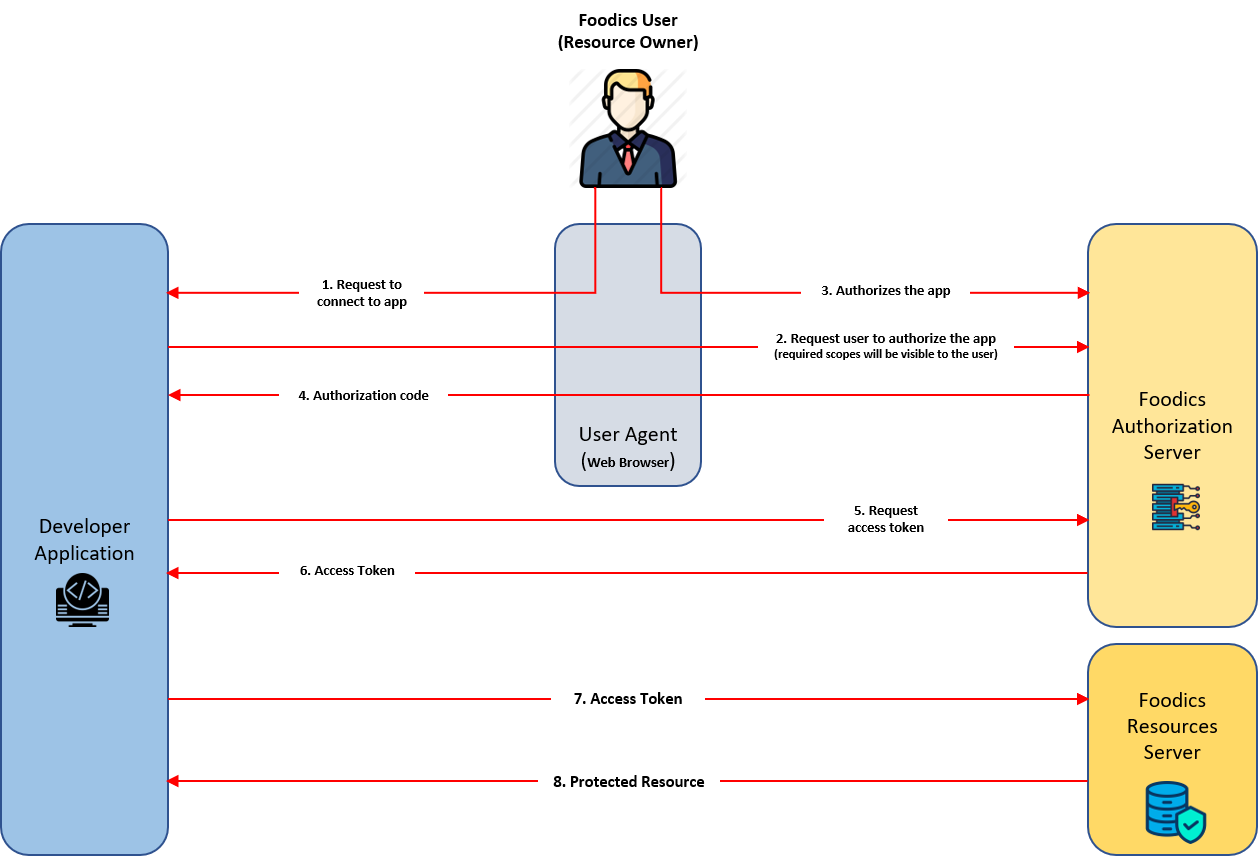
OAuth 2.0 Code Grant is a protocol that lets your app request authorization to access data in a user's account without accessing their password. Your app requests specific permission scopes and is granted an authorization code upon a user's approval. Your app will use the authorization code to request an access token, which will be used to access the user's data
You'll need to create an app before getting started. Each app is assigned a unique Client ID and Client Secret which will be used in the OAuth flow. The Client Secret is private and should not be shared.
# Detailed Process
# 1. The user requests to connect to your app
Once your app is live on Ristecho apps store, the user will be able to see its details and connect to it. There will be a button that the user clicks to request to connect to your app. Once pressed, the OAuth flow will start.
# 2. Your App will Request Authorization from User
Your app will request authorization from user in order to proceed with the authorization flow. The scopes that the apps need will be presented to the user. The user will be asked if he/she is willing to give your app access to the requested scopes.
# 3. The User Authorizes your App
If user agreed to authorize your app, Ristecho will redirect the user to your redirect link with an authorization code. If user rejected to authorize your app, the OAuth flow will end and the user will not be able to connect to your app.
# 4. Your App will Exchange the Authorization Code for an Access Token
Once your app obtains the authorization code upon user authorization, your app will use the given authorization code to request an access token from Ristecho authorization server
Note: Authorization code lifetime is 600 seconds. After that, the authorization code will expire and won't be valid to be used to generate access token
# 5. Requesting Access Token
The request should include the following parameters:
grant_type, this is to identify the grant type as OAuth 2.0 supports multiple grant types. Ristecho uses grant typeauthorization_codeonlycode, the authorization code your app obtained upon user authorizationclient_id, your app client id, given to you by Ristecho team when creating your appclient_secret, your app secret, given to you by Ristecho team when creating your appredirect_uri, must be the same redirect uri you redirected the user to during user authorization (step 2)
Sample Request
curl -X POST \
  URL/oauth/token \
  -H 'Content-Type: application/json' \
  -d '{
    "grant_type": "authorization_code",
    "code": "def50206ed2c3dff808d16ff54904e.........",
    "client_id": "8f1ad782-3e35-4576-a0bb-d4f419b80a77",
    "client_secret": "wFakBkhMu7oIxWUPexHwLvdmx8romv52fucl5r8c",
    "redirect_uri":"https://yourapp.com"
}'
# 6. The Authorization Server will Return an Access Token
If your request to get access token is valid, the authorization server will return an access token. If your request is invalid, the authorization server will return an error message
Sample Response on valid request
{
    "token_type": "Bearer",
    "access_token": "eyJ0eXAiOiJKV1QiLvRH..........."
}
token_type: always Bearer (case sensitive)access_token: the token that will allow you to access user data
# 7. Your App will Use the Access Token to Access User Data
Now that your app has obtained the access token, you will be able to access user data. The data your app can access depends on the scopes your app is authorized on
Sample Request
curl -X GET \
  URL/addresses \
  -H 'Accept: application/json' \
  -H 'Authorization: Bearer eyJ0eXAiOiJ.............' \
  -H 'Content-Type: application/json'
# 8. The Resources Server will Return the Requested Data
If the requested data is within your app scopes, the server will return the requested data. If requested data is out of your app scopes, server will return an authorization error
Sample Response on valid request
{
  "data": [
    {
      "id": "8d92cc27-5429-4c66-a840-bf2f7360f756",
      "name": "Work Address",
      "description": "15688 Kohler Ceceliaville, RI 90603",
      "latitude": "26.295234",
      "longitude": "4.076668",
      "created_at": "2019-04-30 09:24:58",
      "updated_at": "2019-05-28 09:35:02",
      "deleted_at": null
    }
  ]
}